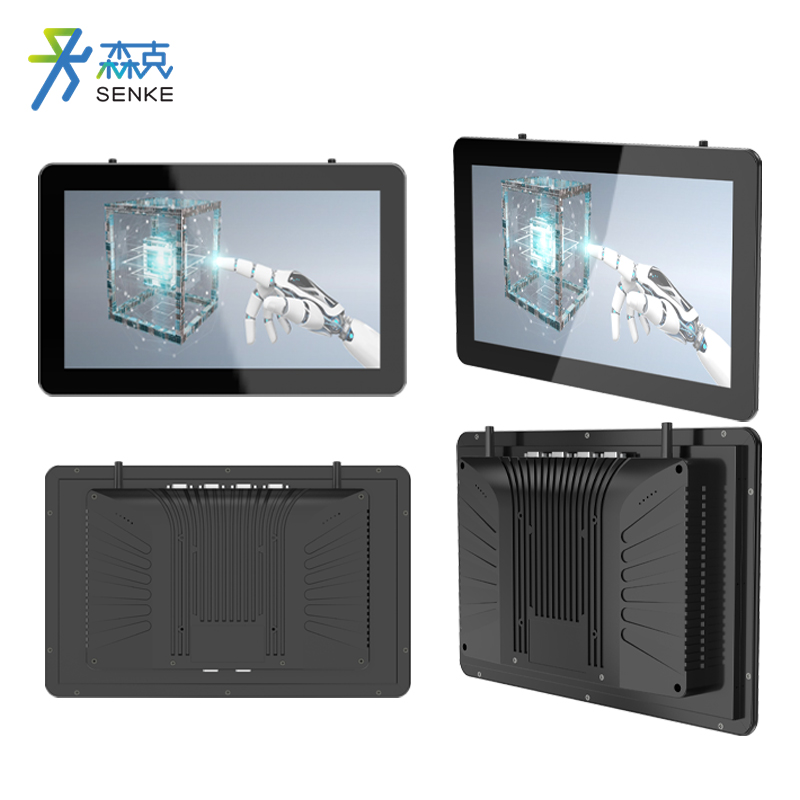
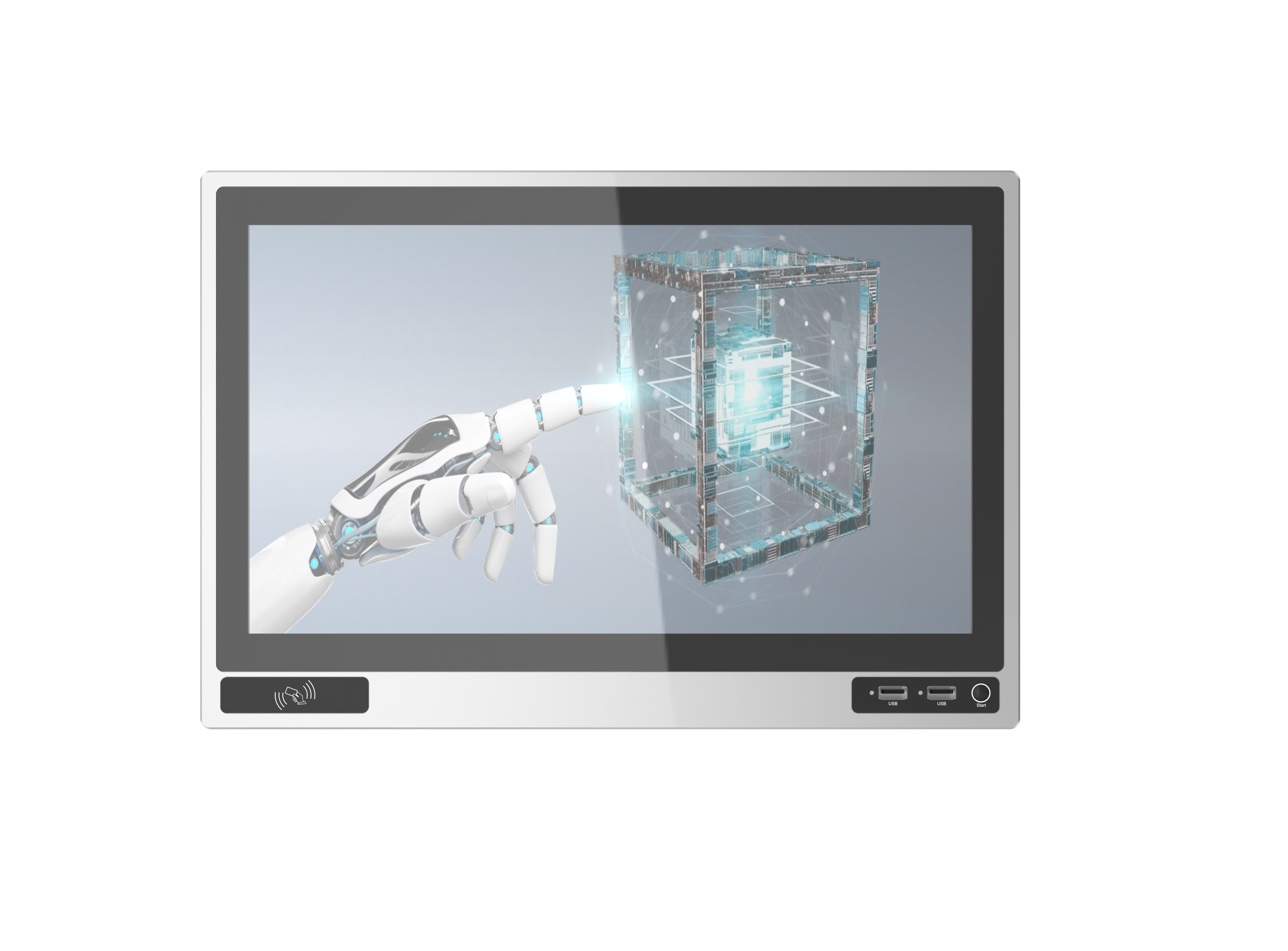
Key points for selecting industrial touch screens: size, interface, and protection level
Product knowledge 2026-03-03
Industrial touch screens, as the core human-computer interaction devices in industrial automation, intelligent manufacturing, warehouse logistics and other scenarios, the rationality of their selection directly affects the stability of equipment operation, the convenience of operation and the service life. During the selection process of industrial touch screens, size, interface and protection level are the three core considerations. These three factors correspond to the three core requirements of operation adaptation, equipment linkage and environmental tolerance respectively. Ignoring any one point may lead to improper selection and problems such as inconvenient operation, abnormal linkage and easy equipment damage. This article focuses on the three core points of size, interface and protection level, combined with the actual application requirements of industrial scenarios, elaborately analyzes the selection logic, adaptation principles and precautions of each point, providing objective and implementable selection references for industrial practitioners, avoiding selection misunderstandings and ensuring that the selected industrial touch screens meet the requirements of the scenarios.
- Size selection: Matching the operational environment and visual requirements
The size of industrial touch screens directly affects the ease of operation and visual experience. The core of selection is “matching the operational requirements of the scene with the installation space”. There is no need to blindly pursue large sizes. It is necessary to make a comprehensive judgment based on factors such as the installation location, operational complexity, and viewing distance to ensure efficient operation and clear vision.
(1) Core selection logic
When selecting the size of an industrial touch screen, both “operational convenience” and “space compatibility” need to be taken into account. The core principle is that the more complex the operation functions and the more data to be displayed, the larger the required size; if the installation space is smaller and the operation frequency is lower, the size can be appropriately reduced. At the same time, the viewing distance of the operator should be considered to ensure that the displayed content is clearly visible.
(II) Sizing Recommendations for Different Scenarios - Small industrial control terminals and portable devices: These devices have limited installation space and relatively simple operation functions. They mainly focus on basic parameter settings and status viewing. It is recommended to choose a size of 3.5 to 7 inches. This size is small and lightweight, suitable for the installation needs of small devices, and can also meet basic touch operation requirements. It is suitable for handheld terminals, small PLC control cabinets and other scenarios.
- Standard industrial equipment operation panels (such as machine tools, small AGVs): In this type of operation scenario, the required functionality is moderate. Basic operating parameters and operation instructions need to be displayed. The installation space is relatively ample, and it is recommended to choose a size of 7-10 inches. This size balances the convenience of operation and the clarity of display. Operators can quickly complete parameter settings and instruction issuance, making it suitable for most conventional industrial equipment.
- Central control platform, automated production line management terminal: In such scenarios, multiple-dimensional data (such as equipment operation status, production progress, fault information) need to be displayed centrally. The operation functions are complex and it is necessary to support multi-window operation. It is recommended to choose a size of 10-15 inches. This size can clearly present multiple sets of data, facilitating the overall control by the operators and is suitable for control rooms in workshops and total control terminals for production lines.
- Large-scale monitoring platforms, public display terminals: In such scenarios, the viewing distance is relatively far, and it is necessary to present a large amount of data or the status of multiple devices simultaneously. It is recommended to choose a screen size of 15 inches or larger. This size offers a wide display range and provides an excellent visual experience, making it suitable for large-scale intelligent manufacturing workshop control screens, public area industrial monitoring terminals, and other scenarios.
(III) Notes on Dimension Selection - Matching installation space: Before making the selection, it is necessary to measure the opening dimensions of the installation panel and the size of the installation area to ensure that the size of the touch screen precisely matches the installation space. Avoid situations where the screen is too large and cannot be installed, or too small and causes loose fixation. At the same time, reserve reasonable operation and maintenance space.
- Considering the operation frequency: For high-frequency operation scenarios, choose products with moderate size and a well-arranged touch area layout. Avoid products with excessive size that may cause inconvenience during operation, or those with too small size that may result in reduced touch accuracy.
- Adaptation to viewing distance: Select the size based on the regular viewing distance of the operator. The larger the viewing distance, the larger the size can be. This ensures that the displayed content is clearly visible and avoids eye fatigue caused by a too small size.
II. Interface Selection: Ensuring Stable Equipment Interconnection and Data Transmission
The interface of the industrial touch screen is the core for achieving interconnection with PLC, MES system, sensors, frequency converters and other devices. The type and quantity of the interface directly affect the stability of data transmission and the compatibility of the equipment. The key point of selection is “matching the interface requirements of the interconnecting devices to ensure smooth communication”.
(1) Common Interface Types and Adaptation Scenarios
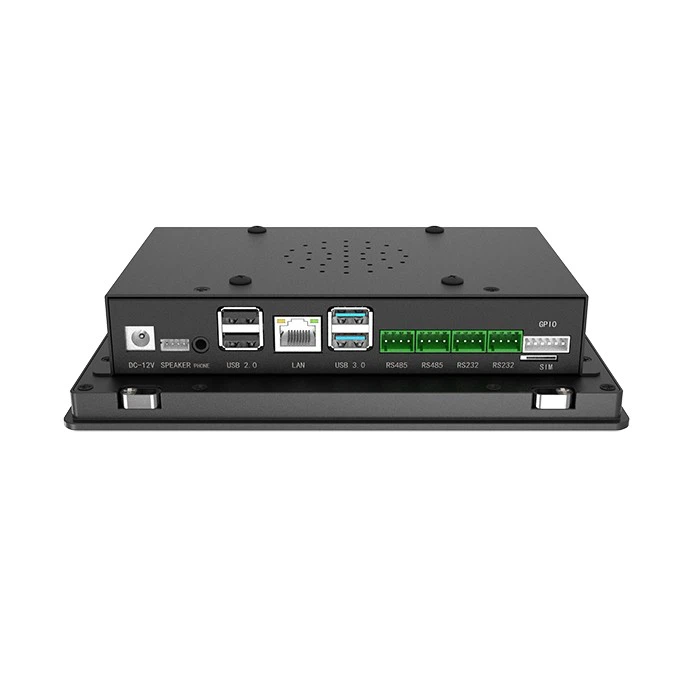
The common interfaces of industrial touch screens can be classified into three types: communication interface, power interface, and expansion interface. The functions and applicable scenarios of each interface vary, and the selection should be made based on the interface type of the associated equipment. - Communication Interface: The core component for data transmission and command interaction, it is the key factor in interface selection. Common types include:
Ethernet interface: It offers high transmission speed and strong stability, enabling high-speed data interaction with MES systems, PLCs, and industrial internet platforms. It is suitable for scenarios with large data transmission volumes and numerous interlinked devices (such as automated production lines and control centers).
(2) RS485/RS232 interface: With a long transmission distance and strong anti-interference capability, it is suitable for close-range interaction with PLCs, frequency converters, sensors and other devices, and is widely used in conventional industrial equipment (such as machine tools, small AGVs).
(3) USB interface: Primarily used for data export and connection of external devices (such as mice, keyboards, USB drives). It is suitable for scenarios where frequent data export and external operation devices are required. When selecting, pay attention to the version and quantity of the USB interface to meet the external connection needs. - Power Interface: This is used to supply power to the touch screen. Common types include DC power interfaces (such as DC 24V) and AC power interfaces (such as AC 220V). When selecting the type, it is necessary to match the on-site power supply method to ensure compatibility between the power interface and the power line, and to avoid equipment failure due to abnormal power supply.
- Expansion Interfaces: These are used for functionality expansion, such as HDMI interface (for connecting external displays), GPIO interface (for connecting external sensors and indicator lights). When selecting, it is necessary to consider the functional requirements of the specific scenario and choose the type and quantity of expansion interfaces as needed, to reserve space for future functionality expansion.
(2) Core Principles for Interface Selection - Compatibility principle: Ensure that the interface type of the touch screen is consistent with that of the associated devices (PLC, MES system, etc.), to avoid problems such as inability to联动 due to interface mismatch and data transmission interruption;优先 choose interfaces that support common communication protocols (such as Modbus, Profinet), to enhance device compatibility.
- Practicality Principle: Select the number and type of interfaces based on the requirements of scene interconnection. There is no need to pursue excessive interfaces to avoid resource waste; interfaces that are frequently used (such as communication interfaces and USB interfaces) can have an appropriate increase in quantity to meet the needs of multi-device interconnection and data transmission.
- Scalability Principle: During the selection process, reserve certain expansion interfaces to facilitate the addition of associated devices and the expansion of functions in the future. This avoids the situation where upgrading is impossible due to insufficient interfaces, thereby reducing the cost of equipment replacement in the later stage.
(III) Notes on Interface Selection
Confirm the interface parameters of the linkage equipment: Before making the selection, clearly define the interface type, communication protocol, and transmission rate of the linkage equipment, ensuring that the interface of the touch screen is consistent with it to avoid compatibility issues. - Pay attention to interface protection performance: In industrial environments, there are often dust and moisture. Interfaces need to have certain protective capabilities. It is advisable to choose interfaces with sealed covers and higher protection grades to prevent dust and moisture from entering the interfaces, which could cause poor contact, corrosion, and damage.
- Consider the convenience of wiring: The location of the interface should be convenient for connecting and organizing the wires. When selecting the type, pay attention to the interface layout to avoid having too many interfaces crowded together, which would result in messy wiring and make maintenance difficult.
III. Selection of Protection Level: Suitable for harsh industrial environments
Industrial scenarios often encounter harsh conditions such as dust, moisture, oil stains, and minor collisions. The protection level of industrial touch screens directly determines their environmental tolerance and service life. The core of selection is “matching the environmental conditions of the scenario to ensure the stable operation of the equipment”. The protection level is usually represented by an IP code, consisting of two digits. The first digit indicates the dust protection level, and the second digit indicates the waterproof level. The larger the number, the stronger the protection capability.
(1) Analysis of Core Parameters of Protection Level - Dust protection level (the first digit): Mainly for dust protection. Common levels include:
(IP5X): It can prevent harmful dust from accumulating and is suitable for scenarios with moderate dust but without significant dust splashing (such as ordinary warehouses and regular workshops).
(2) IP6X: Completely prevents dust from entering, suitable for scenarios with high dust concentration and dust splashing (such as mines and metallurgical workshops). - Waterproofing grade (the second digit): Mainly for protection against water vapor and liquids. Common grades include:
(IPX4): It can prevent water splashes from any direction from entering, suitable for humid and environments with a small amount of water splashes (such as around cleaning workshops, outdoor light rain conditions).
(2) IPX5: Can prevent low-pressure water jets from penetrating, suitable for scenarios involving water jets (such as around high-pressure cleaning equipment).
(3) IPX6: Can prevent high-pressure water jets from penetrating. Suitable for harsh scenarios involving high-pressure cleaning and abundant water vapor (such as chemical workshops, outdoor rainy environments).
In industrial scenarios, the commonly used combinations of protection levels are IP54, IP55, and IP65, which can meet the protection requirements of most industrial environments.
(II) Recommendations for Adaptation of Protection Levels in Different Scenarios - Regular industrial workshops and storage areas: In these scenarios, there is less dust, moderate humidity, and no obvious liquid spraying. It is recommended to choose a protection level of IP54 or higher, which can effectively prevent dust accumulation and the intrusion of a small amount of moisture, ensuring the stable operation of the equipment.
- Dusty environments (such as mines, metallurgy, and cement workshops): In these environments, there is a high concentration of dust and some areas may have dust splashing. It is recommended to choose a protection level of IP65 or higher to ensure complete prevention of dust from entering the equipment interior and to avoid dust causing damage to internal components.
- High humidity and liquid-rich environments (such as chemical plants, cleaning workshops, outdoor scenes): In these environments, there is abundant moisture and there may be liquid spraying. It is recommended to choose protection levels of IP55, IP65 or higher to prevent water vapor and liquids from entering and causing circuit short circuits or interface corrosion.
- High-frequency vibration and collision-prone scenarios (such as construction machinery, mobile industrial control terminals): In addition to dust and moisture, such scenarios also involve equipment collisions and vibrations. It is recommended to choose a protection level of IP55 or higher. At the same time, pay attention to the reinforcement design of the equipment shell to enhance its ability to resist collisions and vibrations.
(III) Notes on Selecting Protection Grades
Match the actual environment of the scene: Before selecting the equipment, thoroughly understand the dust, humidity and liquid contact conditions of the scene. Avoid choosing a protective level that is too high, which would lead to increased costs, or choosing a protective level that is too low, which would cause the equipment to be easily damaged. - Pay attention to the overall protection performance: The protection level is not only determined by the casing, but also related to interfaces, screen seals, ventilation holes, etc. When selecting the model, it is necessary to confirm the overall protection design of the equipment to avoid the failure of overall protection due to insufficient protection at certain parts.
- Considering the installation method of the equipment: For embedded touch screens, attention should be paid to the sealing fit between the installation panel and the touch screen to ensure that the overall protection level meets the requirements after installation; for wall-mounted or upright installed touch screens, attention should be paid to the sealing of the enclosure and the protection of interfaces to prevent rain and dust from entering through the installation gaps.
IV. Comprehensive Consideration of Model Selection and Avoidance of Misunderstandings
When selecting industrial touch screens, the key factors to consider should be size, interface, and protection level. At the same time, comprehensive consideration should be given to the operational requirements of the scenarios, the requirements for equipment interconnection, and the budget range. Avoiding single-dimensional selection to ensure insufficient adaptability is crucial. Also, be cautious of the following common selection mistakes.
(1) Key Considerations for Comprehensive Evaluation
Priority ranking: Sort according to the core requirements of the scenarios. For instance, in harsh environment scenarios, the priority is given to the protection level; in scenarios involving multiple devices working together, interface compatibility is given priority; and in scenarios with frequent operations, size compatibility is given priority. - Budget Adaptation: Under the premise of meeting the requirements of the scenario, reasonably control the budget to avoid blindly pursuing high protection, large size, and multiple interfaces, which may lead to cost waste; at the same time, avoid choosing products with insufficient protection level and interface quantity to save costs, which may affect the service life of the equipment.
- Post-maintenance: When selecting equipment, consider the convenience of its post-maintenance process. For instance, the interface layout should facilitate wiring and maintenance, and the size should be suitable for accommodating subsequent repair space, thereby reducing maintenance costs.
(II) Common Misunderstandings in Selection - Blind pursuit of large size: believing that the larger the size, the better, while ignoring the installation space and operational convenience, resulting in the inability to install the equipment, inconvenient operation, and increased costs.
- Ignored interface compatibility: Focused solely on size and protection level, without verifying the compatibility of interface type with the associated devices, resulting in the inability to联动 the devices and abnormal data transmission.
- Excessive pursuit of high protection levels: Choosing products with overly high protection levels in regular environments leads to waste of costs, and such high protection levels may also affect the heat dissipation and operational convenience of the equipment.
- Ignoring scene details: The equipment was selected without considering factors such as the operation frequency of the scene, viewing distance, and wiring requirements. This led to insufficient equipment adaptability and negatively impacted the user experience.
V. Summary
The selection of industrial touch screens mainly focuses on three key points: size, interface, and protection level. Based on the actual needs of industrial scenarios, the goal is to achieve “size adaptation for operation and space, interface guarantee for communication and transmission, protection adaptation for environment and lifespan”. The size selection should take into account both operational convenience and space compatibility. The interface selection should emphasize compatibility and practicality. The protection level selection should match the environmental conditions of the scenario. The three aspects are mutually reinforcing and cannot be missing.
During the actual selection process, it is necessary to abandon the single-dimensional selection mindset and comprehensively consider factors such as scene requirements, budget range, and post-maintenance. Avoid common selection mistakes and ensure that the selected industrial touch screen can operate stably, be suitable for the scene, fully play the core role of human-computer interaction, and provide reliable support for industrial production and equipment management. At the same time, in combination with the equipment manual and the actual situation of the scene, further refine the selection parameters to improve the accuracy of the selection.