Understanding the Selection and Application Scenarios of Industrial Touchscreen Computers in China
Product knowledge 2026-03-31
As core human-machine interaction terminals in the industrial automation and intelligent manufacturing systems, industrial touchscreen computers are widely used in various industrial scenarios. The rationality of their selection directly affects production efficiency, equipment stability, and maintenance costs. Unlike consumer-level touch devices, industrial scenarios have stricter requirements for equipment’s environmental adaptability, interface compatibility, and operational stability. The selection must be comprehensively considered based on factors such as scenario needs, technical parameters, and actual working conditions. This article will systematically summarize the key points of industrial touchscreen computer selection and typical application scenarios, providing practical references for relevant practitioners.
I. Core Points of Industrial Touchscreen Computer Selection
The selection of industrial touchscreen computers should adhere to the core principles of “suitable for the scenario, stable and reliable, and compatible and expandable”, focusing on the following five dimensions to avoid equipment failure due to parameter mismatch or increased maintenance costs.
(1) Scenario Adaptation: Prioritize matching industrial working environments
Industrial scenarios have significant differences in working conditions. The selection should primarily consider environmental adaptability, focusing on three aspects: First, temperature adaptation, which requires selecting products that support the corresponding wide temperature range based on deployment environments such as workshops, outdoors, and cabinets. For regular industrial scenarios, it is recommended to choose products with a -20°C to +60°C wide temperature range. In extreme environments (such as outdoor low-temperature and high-temperature workshops), products with a -40°C to +85°C wide temperature range can be selected; Second, protection level, in scenarios with a lot of dust, oil, and water stains in workshops, priority should be given to products with a front panel IP65 or higher protection level to prevent foreign objects from entering and affecting equipment operation; Third, anti-interference ability, industrial sites have electromagnetic radiation, vibration, etc., interference, so products that have passed EMC (electromagnetic compatibility) certification should be selected to ensure stable operation in complex electromagnetic environments.
(2) Touch Type: Choose based on operation scenarios
The touch types of industrial touchscreen computers mainly include resistive, capacitive, and infrared. Different types are suitable for different operation scenarios and need to be selected as needed:
- Resistive touch: Supports gloves and hard objects (such as pen tips, wrenches) for operation, has better resistance to oil stains and dust, suitable for scenarios with oil and dust such as mechanical processing, food processing, and mining, and can meet the requirements of conventional parameter settings for operation accuracy;
- Capacitive touch: High sensitivity, supports multi-point touch, offers an operation experience close to consumer-level devices, suitable for scenarios requiring rapid operation and complex interface interaction, such as intelligent production line monitoring and data visualization terminals, but may be affected by oil stains and damp environments;
- Infrared touch: Suitable for large screens (15 inches and above), has strong anti-interference ability, supports multi-person simultaneous operation, suitable for scenarios such as large monitoring centers and workshop dispatching desks.
(3) Hardware Parameters: Balance Performance and Practicality
Hardware parameters do not need to blindly pursue high-end, but should be reasonably selected based on actual application needs. The core focuses are three points: First, processor and memory, for regular data collection and simple control scenarios, choosing entry-level industrial processors (such as ARM Cortex-A series, Intel Celeron series) and 2GB or more memory is sufficient; for complex scenarios (such as edge computing, multi-device linkage), stronger processors and 4GB or more memory can be selected; Second, display parameters, based on viewing distance and clarity requirements, choose resolution and brightness according to needs. In strong light environments in workshops, a high-brightness, anti-glare screen with a resolution of 300cd/㎡ or above is recommended, and for precise operation scenarios, a 1920×1080 resolution screen can be selected; Third, storage capacity, based on data storage requirements, 8GB/16GB flash memory is sufficient for regular scenarios, and for scenarios requiring the storage of a large amount of historical data, 32GB or above flash memory or support for hard drive expansion can be selected.
(4) Interfaces and Protocols: Ensure Equipment Interconnection
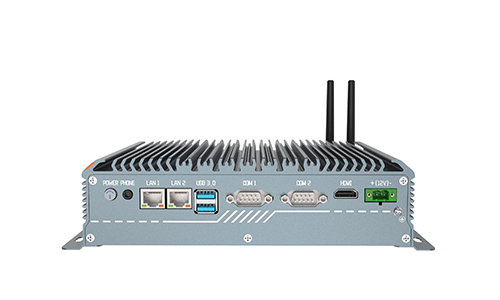
Industrial touch screen computers need to be connected to various industrial equipment such as PLCs, sensors, frequency converters, AGVs, etc. The compatibility of interfaces and protocols is of crucial importance. When selecting models, attention should be paid to the types and quantities of interfaces, and products with common interfaces such as serial ports (RS232, RS485), network ports (RJ45), USB, and GPIO should be preferred to meet the requirements for connecting multiple devices. At the same time, it is necessary to confirm that the equipment supports industrial protocols (such as Modbus, Profinet, OPC UA, etc.) to ensure compatibility with existing equipment and control systems on site and avoid communication issues.
(5) System and Software: Adaptation to Industrial Application Requirements
When choosing a system, it is necessary to consider the software deployment requirements. Mainstream industrial touch screen computers support Windows, Linux, Android, and domestic operating systems (such as Kylin, UOS). Among them, the Windows system has strong compatibility and is suitable for most industrial software; the Linux system has high stability and is suitable for scenarios requiring long-term continuous operation; domestic operating systems can meet data security and innovation requirements and are suitable for scenarios with requirements for self-controlled autonomy. At the same time, it is necessary to confirm the configuration software and types of industrial software supported by the equipment to ensure compatibility with the on-site production management systems (such as MES, SCADA).
II. Typical Application Scenarios of Industrial Touch Screen Computers in China
With the advancement of industrial digital transformation, industrial touch screen computers have penetrated the entire industrial production process and cover multiple specialized fields. The following are the most representative application scenarios, and the selection focus is explained based on the characteristics of the scenarios to provide reference for practical applications.
(1) Industrial Automation Production Line Control Scenario
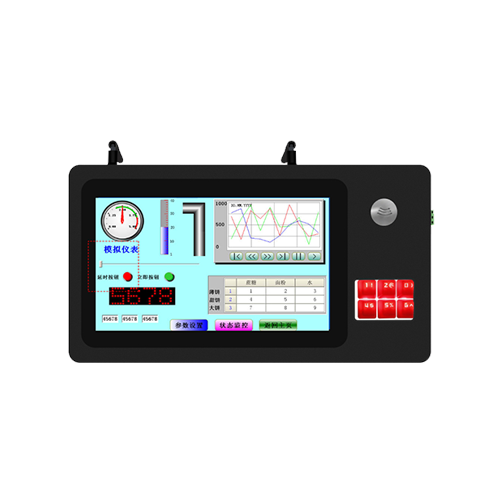
This scenario is the core application domain of industrial touch screen computers, mainly used for the operation and monitoring of automated equipment such as machine tools, injection molding machines, packaging machines, and assembly lines, and performs functions such as parameter setting, start-stop control, fault alarm, and real-time visualization of operation status. The working conditions are characterized by high dust and heavy oil contamination, and require long-term continuous operation. When selecting, priority should be given to resistive touch, IP65 protection level, and wide temperature design products, and the interfaces should include RS485, network ports, and support Modbus protocol to ensure seamless connection with PLCs, frequency converters, etc. For example, in the mechanical processing production line, the touch screen computer can display the spindle speed and cutting parameters of the machine tool in real time, and the operator can adjust the parameters through the touch interface, triggering alarms in case of faults, ensuring the continuous operation of the production line.
(2) Intelligent Manufacturing Data Visualization Scenario
In intelligent factories and digital workshops, industrial touch screen computers serve as the terminal carriers of MES and SCADA systems, used to display production progress, qualification rates, energy consumption, and equipment operation status, assisting on-site managers in making quick decisions. This scenario has high requirements for display clarity and operation smoothness, and when selecting, priority should be given to capacitive touch, high resolution (1920×1080), and high-brightness screens. The processor performance should meet the requirements for multi-data synchronous display, and it should also support Ethernet, Wi-Fi, etc. network connections to ensure real-time data upload and update. For example, in the new energy battery production line, the touch screen computer can display the qualification rates of each process and equipment load rates, helping managers quickly identify production bottlenecks.
(3) Energy and Power Monitoring Scenario
In the energy and power sector (such as substations, wind power, and photovoltaic power stations), monitoring terminals need to adapt to outdoor, high electromagnetic interference, and wide temperature complex working conditions, mainly used for equipment status monitoring, data collection, remote control, and fault early warning. When selecting, it is necessary to choose anti-glare, high protection (IP66 and above), wide temperature (-40°C to +70°C), and strong anti-electromagnetic interference products, and the interfaces should support industrial Ethernet protocols to ensure compatibility with power monitoring systems. For example, in a substation, touchscreen computers can monitor the operating parameters of transformers and switch cabinets in real time. When abnormalities occur, they can promptly issue alarms, assisting maintenance personnel in quickly troubleshooting.
(4) Warehousing and Logistics Control Scenarios
In scenarios such as vertical warehouses, AGV scheduling, and logistics sorting, industrial touchscreen computers are used for command issuance, tracking of goods status, and equipment scheduling. The characteristics of the working conditions are strong mobility and relatively clean environment. Some scenarios require outdoor operation. When selecting, capacitive or infrared touch can be chosen, supporting wireless communication (Wi-Fi, 5G). In terms of structure, flexible installation methods such as wall-mounted or cantilevered should be prioritized to ensure compatibility with the space layout of the warehouse workshop. For example, in the AGV scheduling scenario, touchscreen computers can issue sorting and transportation instructions, and display the running position and task progress of AGVs in real time, improving logistics efficiency.
(5) Lightweight Automation Scenarios for Small and Medium-sized Enterprises
For small and medium-sized enterprises, industrial touchscreen computers are mainly used for single-machine equipment automation and local production line networking. The requirements are mainly simple control and data collection, and they are sensitive to cost control. When selecting, products with moderate cost performance can be chosen, prioritizing stability and basic interface compatibility. There is no need to pursue high-end parameters. For example, choosing entry-level processors, resistive touch, and basic interface configurations can meet the parameter setting and status monitoring requirements of single-machine equipment, helping small and medium-sized enterprises achieve automation upgrades at a lower cost.
(6) High-end Equipment Support Scenarios
In high-end equipment fields such as rail transit, medical equipment, and aerospace, industrial touchscreen computers serve as the core interaction terminals and need to meet higher reliability, safety, and industry certification requirements. For example, in the rail transit scenario, products that have passed the EN50155 railway standard certification should be selected, supporting wide temperature and strong anti-vibration; in the medical equipment scenario, products that comply with medical-grade standards and have biocompatibility should be chosen to ensure safety. When selecting, attention should be paid to industry-specific certifications and customization capabilities to ensure that the products meet the special needs of high-end equipment.
III. Selection Misunderstandings and Precautions
During the actual selection process, some practitioners may fall into the misunderstandings of “higher parameters are better” and “blind pursuit of low prices”, resulting in equipment not matching the scenarios and increased maintenance costs. Please note the following three points: First, avoid blindly pursuing high-end parameters and select based on actual application needs. There is no need to pay extra costs for non-essential functions; second, pay attention to product reliability and after-sales service. Industrial equipment has a longer lifespan, choosing products with complete after-sales service and reasonable warranty periods can reduce later maintenance troubles; third, consider scalability. As production upgrades occur, the equipment may need to connect more peripherals or software. When selecting, reserve interfaces and performance redundancy to facilitate later upgrades. Conclusion
The core of selecting industrial touch screen computers in China is “scene adaptation”, which requires comprehensive consideration of factors such as working conditions, operational requirements, and equipment compatibility. It is necessary to ensure the stable operation of the equipment while also taking into account practicality and economy. Its application scenarios have covered the entire process of industrial production. The differences in working conditions in different scenarios determine the different focuses of selection. With technological advancements, the functions of industrial touch screen computers have been continuously improved. When selecting, one needs to pay attention to the technological development trends and choose appropriate products based on one’s own needs, so as to fully exert their supporting role in industrial automation and intelligent manufacturing, and help improve production efficiency and promote industrial upgrading.